The Magic of F12: Why Frontend Security Is an Illusion
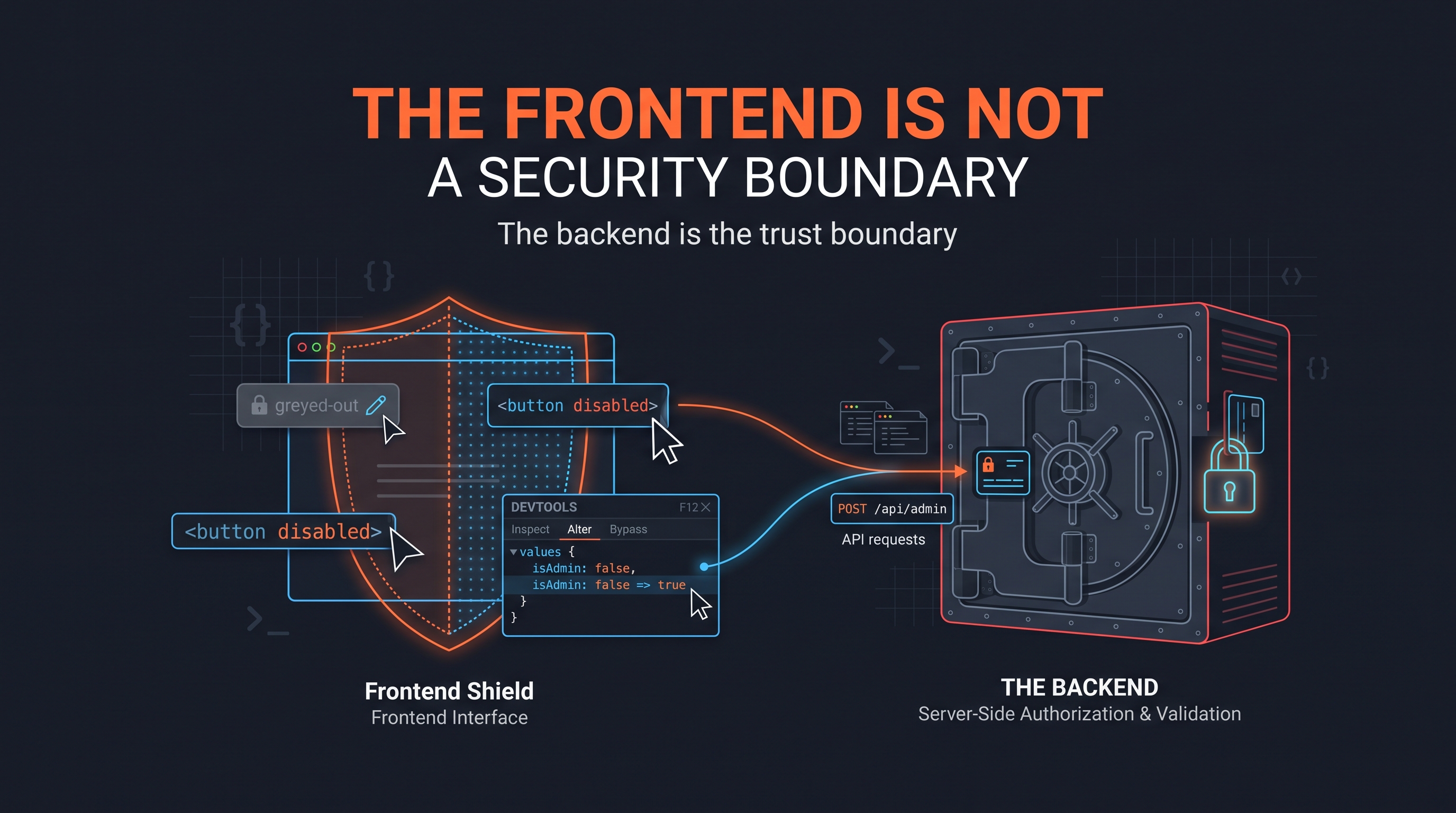
The frontend is not a security boundary
If the previous post was about finding open doors from the outside, today we're going inside. Many website owners believe that a greyed-out button, a hidden field or a disabled admin feature means the system is protected.
It doesn't.
There is a simple rule in web development: never trust the client. Everything running in the user's browser is under the user's control. They can inspect the HTML, modify JavaScript, replay requests, change browser storage or simply stop using your interface altogether.
Network: an X-ray of your website
Open DevTools and switch to the Network tab. You can see requests, parameters, headers, responses and status codes exchanged between the browser and the server.
This is often where the real security model becomes obvious.
Secrets inside requests
If an API key or another secret is sent to the browser in plain sight, it should be considered exposed. Hiding it from the interface does not make it secret.
The server may reveal more than the UI
A server can return a complete user object containing fields that the frontend simply chooses not to display.
Hiding a field with CSS or refusing to render it in React is not access control. If the data has already reached the browser, the user can potentially inspect it.
Replaying requests
Browser requests can be copied and reproduced independently of the UI. Chrome DevTools provides options such as Copy as fetch and Copy as cURL.
This is extremely useful when testing your own application: does the backend actually validate permissions and parameters, or does it simply assume the browser will behave?
Postman: when the interface is no longer relevant
If Network is an X-ray, Postman is the surgical instrument. Once a legitimate request is understood, it can be reproduced independently of the website interface.
This makes it possible to test whether the server properly validates:
- product prices and quantities;
- user permissions;
- object ownership;
- unexpected input;
- access to another user's resources.
The dangerous assumption is: “If the button doesn't exist, nobody can make the request.”
The backend doesn't care about your buttons, colors or layout. It receives an HTTP request. If the server does not enforce the rules itself, the frontend cannot enforce them for you.
DOM: disabled is not a lock
Attributes such as disabled, required, maxlength and type="email" are useful for user experience and basic client-side validation. They are not security controls.
A user can modify the DOM using DevTools. They can remove disabled, change an input type or modify an attribute.
If the server then accepts an operation that should have been forbidden, the problem is not the frontend. The problem is missing server-side authorization.
Application: what the website leaves in your browser
The Application tab exposes Cookies, Local Storage, Session Storage, IndexedDB and other client-side data.
Cookies and session tokens
Authentication data deserves special attention. If sensitive session information is exposed to JavaScript unnecessarily, an XSS vulnerability can have serious consequences.
Authentication cookies should be configured with appropriate security attributes, including HttpOnly, Secure and an appropriate SameSite policy.
Local Storage should not decide who is an administrator
Using Local Storage for a theme or language preference is fine. Using it as the source of truth for authorization is not.
If a frontend trusts a value such as:
{
  "isAdmin": false,
  "canEdit": false
}
the user can modify it locally. The UI may then display additional controls.
A properly designed backend should simply reject unauthorized operations regardless of what the browser claims.
IndexedDB
Modern applications can store significant amounts of information in IndexedDB, including cached documents, records and application data.
Anything sent to the browser should therefore be treated as potentially accessible to the user. If data must remain secret, it should not be delivered to the client merely for convenience.
Console: more than a place for errors
The browser console is a JavaScript execution environment running in the context of the page.
Older or poorly designed applications sometimes expose important functions through the global window object. If a sensitive operation can be triggered through client-side JavaScript without server-side authorization, hiding the corresponding button provides no real protection.
The console can also interact with data already present in the DOM. For example, during legitimate testing, developers can quickly collect values from elements:
Array.from(document.querySelectorAll('.user-email'))
  .map(el => el.innerText)
This illustrates the same principle: once information is in the browser, the user can potentially access it.
Never blindly paste code into the Console
There is another important lesson here: social engineering. If someone claiming to be support asks you to paste an unknown JavaScript snippet into the Console to get free credits, unlock a feature or recover an account, don't do it.
Code executed in the console runs within your browser session and can potentially interact with page data.
How to actually protect the application
- Authorize every sensitive operation on the server.
- Never trust client-controlled values. Prices, roles, ownership and subscription status must be validated server-side.
- Do not send unnecessary data to the client. Hidden data is still client-side data.
- Protect authentication sessions. Configure cookies and tokens correctly.
- Treat frontend code as public. There are no real secrets in browser-delivered JavaScript.
- Reduce infrastructure exposure. Firewalls, private networks, VPNs and secure tunnels can reduce the attack surface.
- Test the API independently of the UI. A security review should assume that the interface can be bypassed.
Conclusion: F12 doesn't break your security — it reveals it
The browser is hostile territory from the developer's perspective.
Users can modify the DOM, inspect JavaScript, change Local Storage, replay requests and inspect Cookies and Network traffic. That is normal browser behavior.
The real problem appears when the backend trusts something it should never have trusted.
A grey button does not protect a Premium feature. A hidden field does not protect data. An isAdmin flag in Local Storage does not make someone an administrator. disabled is not authorization.
The frontend is an interface. The backend is the trust boundary.
If pressing F12 makes that boundary disappear, F12 was never the real problem.